

VirtuCare
Experience quality care from the comfort of your own home
Telehealth websites and platforms are becoming increasingly important in today's healthcare landscape.
These platforms provide individuals with convenient and accessible options for receiving medical care and advice, allowing patients to connect with healthcare providers from the comfort of their own homes.
VirtueCare is an all-in-one health ecosystem designed to bridge the gap between clinical consultation and daily self-management. It solves the fragmentation problem by centralizing:
- Synchronous Care: Video consultations (Telehealth).
- Asynchronous Care: Chat and file sharing.
- Self-Management: Medication tracking, symptom analytics, and educational content (Health Hub).
UX & UI Design Strategy
User Experience (UX) Goal: Reducing "Medical Anxiety"
My primary UX goal was to reduce the friction and anxiety associated with medical management.
- Flow: I simplified the user journey for booking. As seen in the Doctor Profile screen, the decision matrix (Reviews + Bio + Calendar) is unified to prevent decision paralysis.
- Information Architecture: I grouped complex medical data into digestible tabs (Treatment, Analytics, General Info) to prevent users from feeling overwhelmed by their own medical records.
User Interface (UI) Goal: Trust & Clarity via Data Visualization
My primary UX goal was to reduce the friction and anxiety associated with medical management.
- Color Palette: I utilized a soft blue and white primary palette (evoking hygiene and trust) with pastel accents for categorization. This avoids the sterile, cold look of traditional hospital software.
- Typography: A sans-serif typeface ensures high readability, which is crucial for accessibility in health tech.
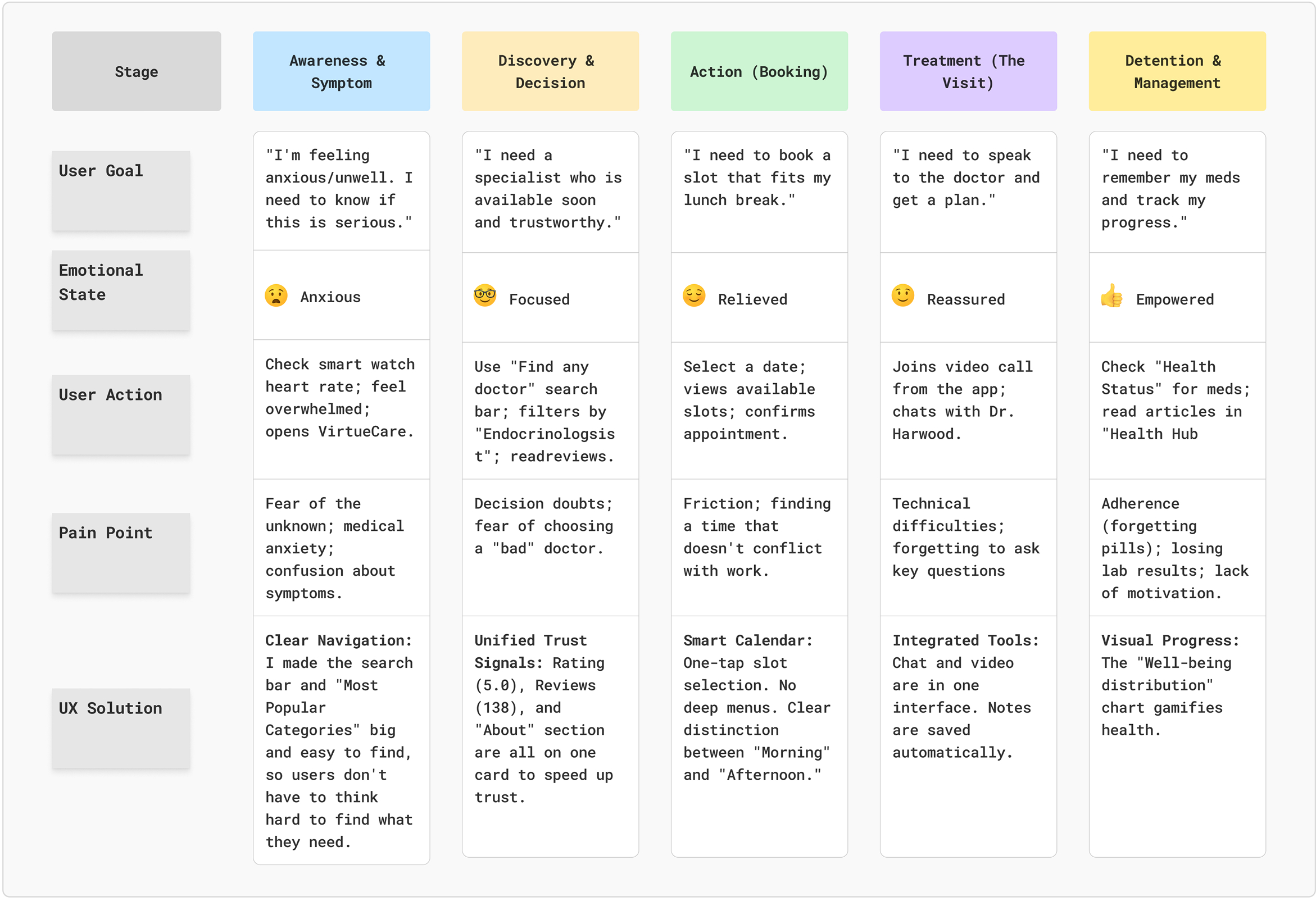
Customer Journey Map
The "VirtueCare" Patient Experience.
Scenario: Andrea (32, Hyperthyroidism) needs to book a follow-up for recurring symptoms and manage her ongoing treatment without disrupting her work week.
Colors
In telemedicine, color is functional, not just decorative. Patients often open health apps while feeling vulnerable, anxious, or unwell. Therefore, the UI must avoid over-stimulation and instead foster a sense of calm, hygiene, and professional reliability.
For VirtueCare, I chose a blue-monochromatic foundation—the industry standard for trust—paired with a specific functional red.
Role: Primary Text & Branding
Why: This deep blue serves as a softer, more approachable alternative to pure black for typography. It provides high WCAG (accessibility) contrast ratios for readability while projecting authority, stability, and medical expertise.
Role: Active States & Primary Accents.
Why: Used for buttons and active selections, this shade guides the user's eye without being aggressive. It bridges the gap between clinical sterility and a friendly, consumer-facing app experience.
Role: Backgrounds & Cards.
Why: Pure white (#FFFFFF) can sometimes cause eye strain on digital screens, especially during late-night use. These subtle off-white and cool grey tones create a "clean" and "sterile" canvas that feels hygienic and organized, allowing the content (medical data) to breathe.
Typography
In a data-heavy medical interface, legibility is the highest priority. Patients need to read dosages, lab results, and doctor's notes without ambiguity.
Typeface: Plus Jakarta Sans
Category: Geometric Sans-Serif
Screens
Patient Healthcare Dashboard
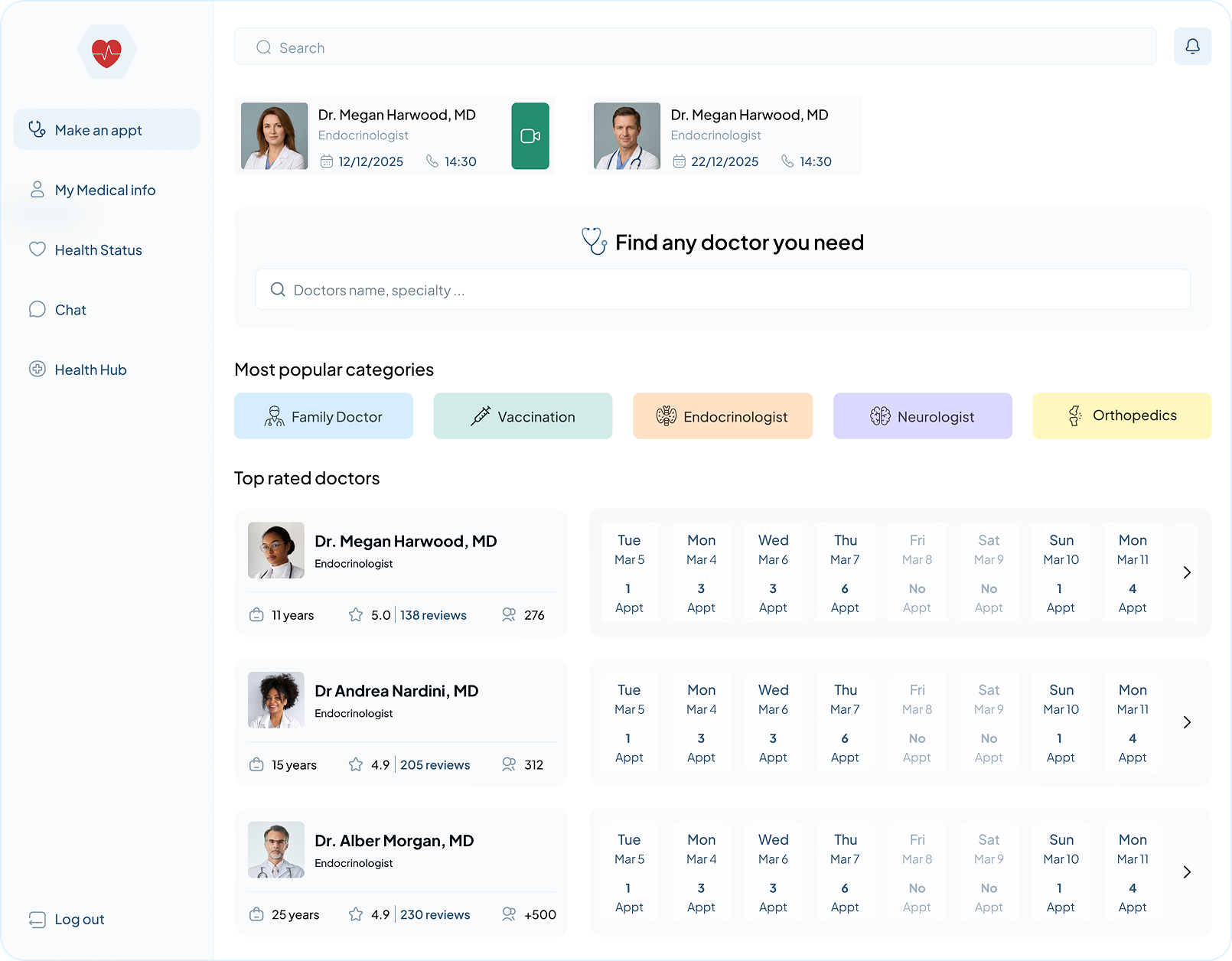
- Fast Access to Care: I put "Upcoming Appointments" at the very top so patients can join a video call in one click without searching through menus.
- Comparison at a Glance: Instead of making users click every doctor's profile, I built a "mini-calendar" into the search results so they can see who is free right now.
- Smart Categorization: I used "Popular Categories" (like Family Doctor or Vaccination) to help users who don't know exactly what they need yet, reducing their mental effort.
- Building Trust: By showing "Years of Experience" and "Reviews" upfront, I give users the data they need to feel safe and confident in their choice.
- Easy Navigation: The sidebar keeps the most important tools (like Chat and Medical History) always visible, so the user never feels lost.
Doctor Profile & Appointment Scheduling
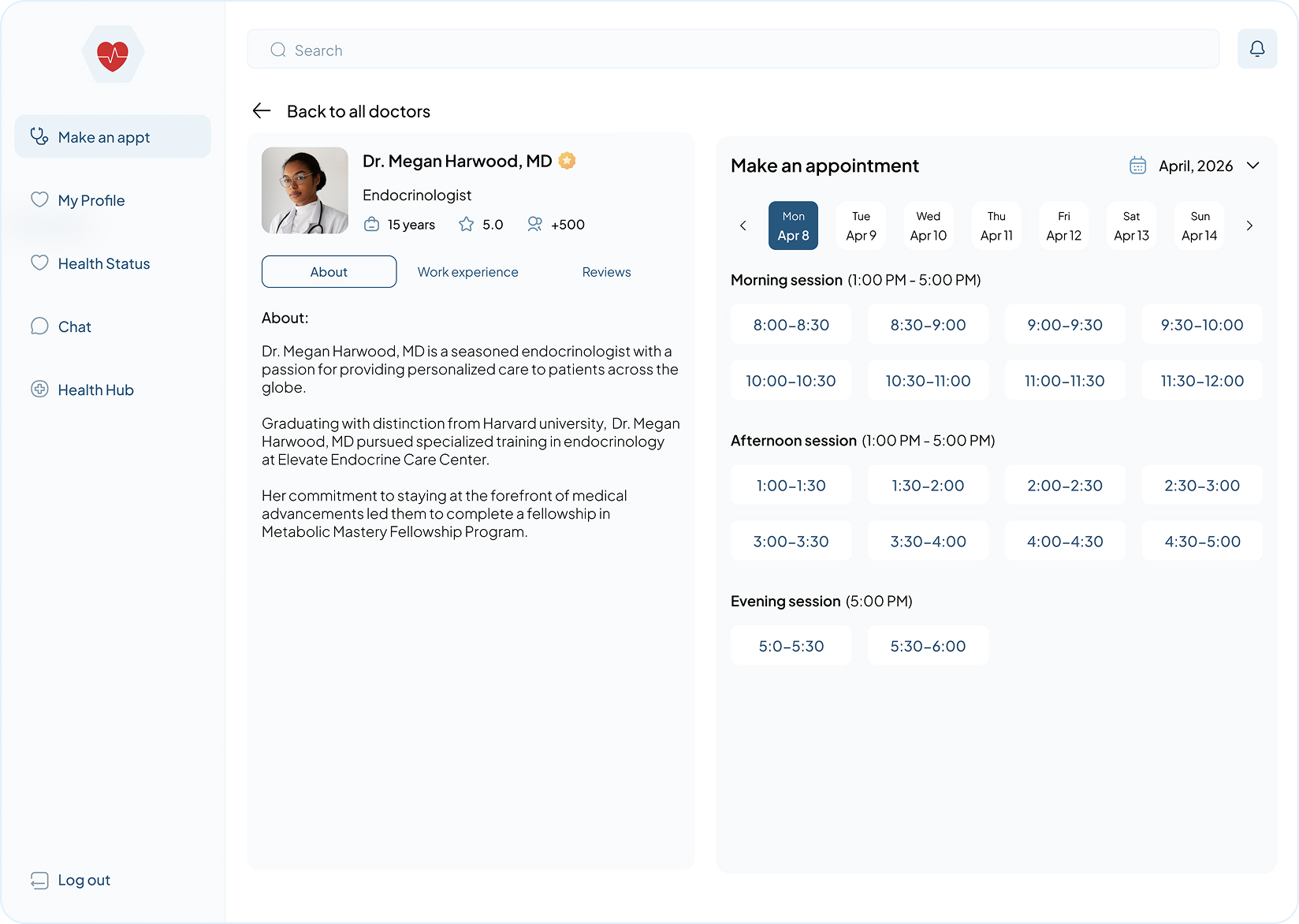
- Trust-Building Layout: I placed the doctor's credentials (years of experience, rating, and total patients) at the very top. This gives the user immediate confidence that the doctor is qualified before they even read the biography.
- Time-Block Chunking: To prevent "choice paralysis," I grouped available slots into Morning, Afternoon, and Evening sessions. This makes it much easier for a user to scan for a time that fits their specific daily routine (e.g., "I need something after work").
- Contextual Information: By including a short "About" section and tabs for "Work Experience" and "Reviews," I keep the user on the page. They don't have to leave the booking flow to research the doctor elsewhere, which keeps the conversion rate high.
- Effortless Date Selection: I used a horizontal date picker that shows the next 7 days at a glance. This allows for quick "one-tap" switching between days without the clutter of a full-month calendar view.
- Clear Feedback Loop: The selected date (e.g., Apr 8) is highlighted with a high-contrast dark color. This provides clear "System Status" (Nielsen's 1st Heuristic), so the user always knows exactly which day they are currently viewing.
- Logical Navigation: The "Back to all doctors" link at the top acts as an emergency exit. If this specific doctor doesn't fit the user's schedule, they can return to their search results in one click without losing their place.
Patient Stats & Analytics
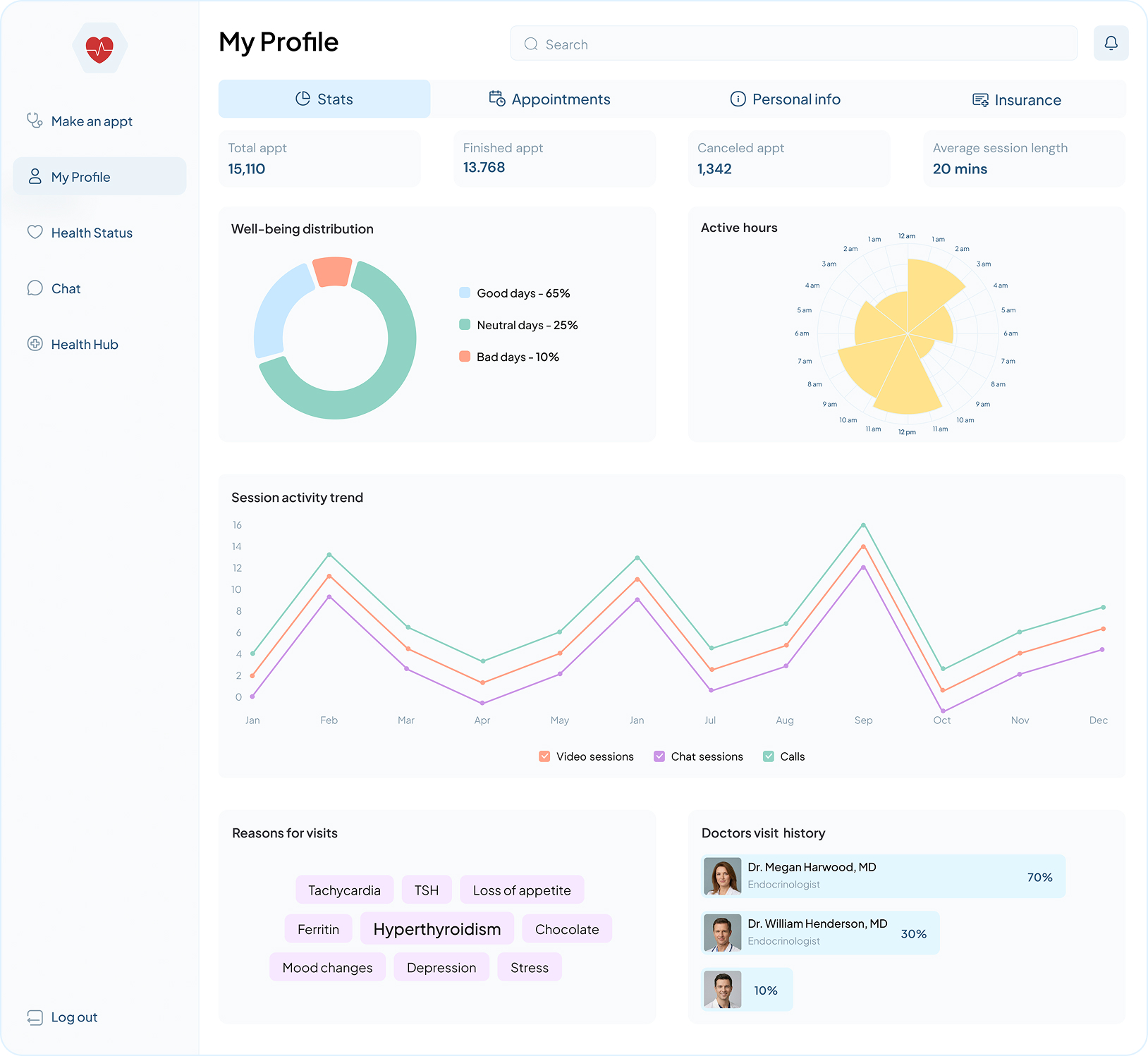
- Progressive Information Disclosure: Used a tabbed navigation system (Stats, Appointments, Personal Info, Insurance) to hide secondary data and prevent the user from feeling overwhelmed.
- Trend Identification: Visualized patient behavior through "Well-being distribution" and "Session activity" charts, shifting the user's role from a passive patient to an active participant in their health trends.
- Mental Model Support: Included a "Reasons for visits" tag cloud that uses font-size scaling to help patients quickly recall their most frequent health concerns and symptoms.
- Data Glanceability: Summarized historical data into high-level "Status Cards" (Total, Finished, and Canceled appointments) to provide an immediate snapshot of the user's healthcare journey.
- Relationship Tracking: Added a "Doctors visit history" section with percentage-based engagement bars to help patients track which specialists they see most frequently.
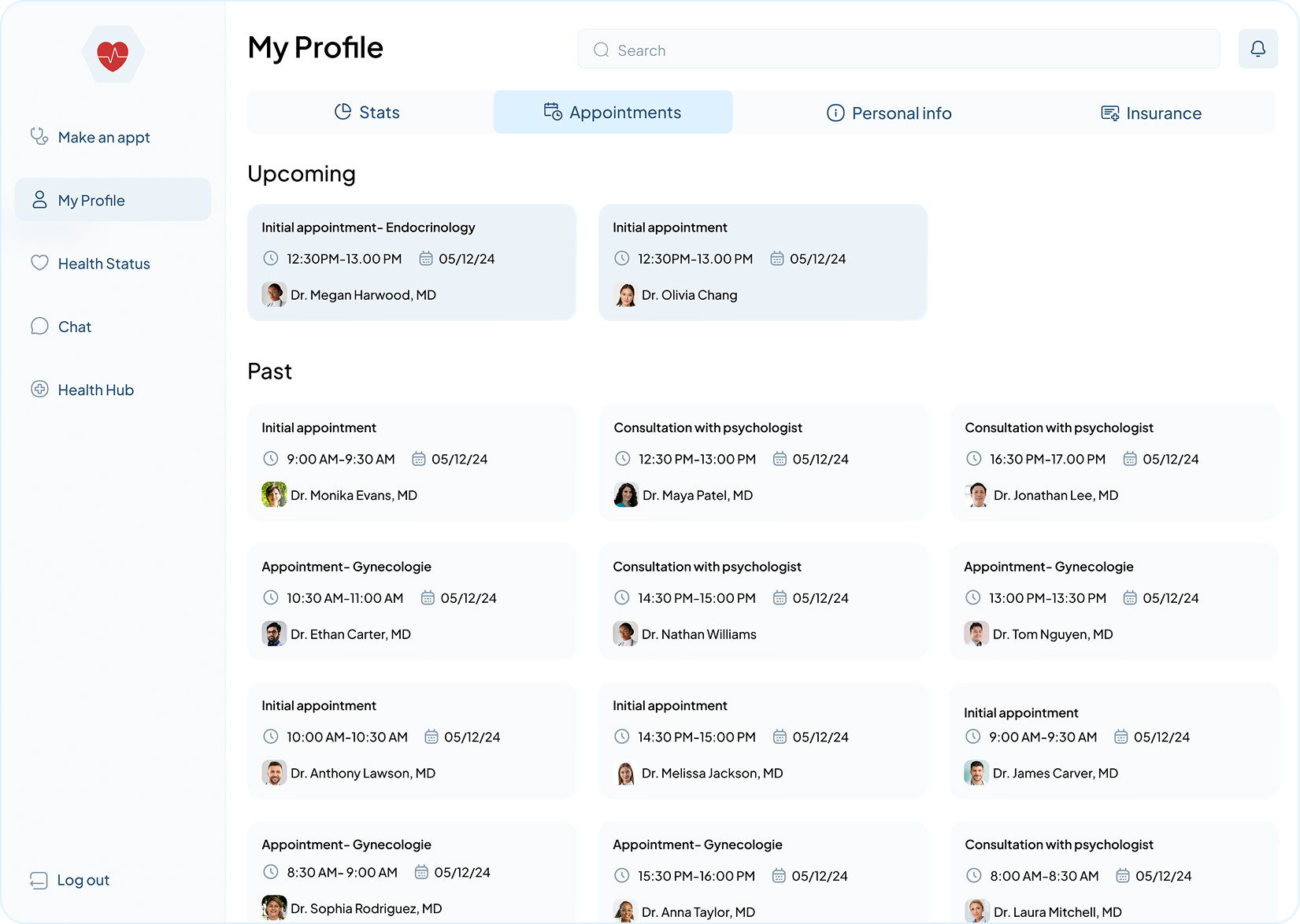
Appointment History
- Temporal Separation: I clearly divided "Upcoming" from "Past" appointments. This separates active tasks from historical records, so the user's "to-do list" is never cluttered by old data.
- Information Consistency: Every card uses the same layout—Time, Date, and Doctor Photo. This creates a "scanning pattern" where the user can find a specific past visit in seconds just by looking at the photos.
- Status Clarity: By listing the specific type of visit (e.g., "Consultation with psychologist"), I help the user differentiate between routine checkups and specialized care without needing to open the details.
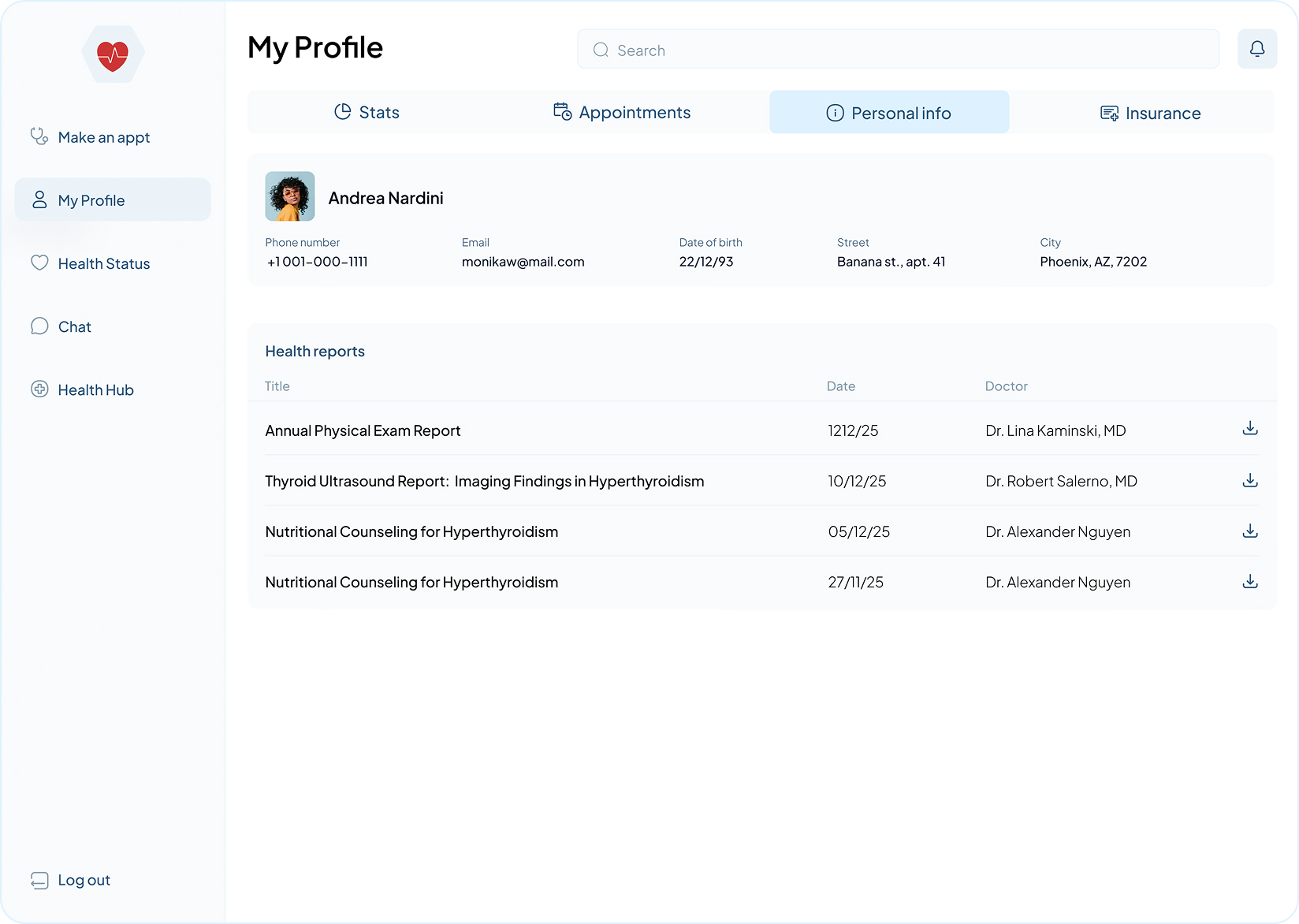
Personal Info & Health Reports
- Logical Information Chunking: The page is split into two clear sections: Identity and Documentation. By placing static personal details (phone, email, address) at the top, I provide immediate context before the user dives into the more complex list of health reports.
- Accessibility of Records: Instead of burying medical files in a "Downloads" folder or a deep menu, I created a centralized Health Reports table. This allows patients to find specific results (like an "Annual Physical Exam") based on date or doctor name without opening multiple files.
- Direct Action (Download Optimization): I included a clear download icon for every report row. This reduces the "time-to-file," allowing users to save or print their results in one click, which is critical for patients who need to bring documents to offline appointments.
- Scalable Navigation: By using a persistent tab system (Stats, Appointments, Personal info, Insurance), I maintain a "Mental Map" for the user. They always know where they are in their profile, which reduces cognitive load when switching between looking at their data and their personal details.
- Clean Hierarchy: I used bold text for report titles to make the list easily "scannable." A user can find "Thyroid Ultrasound" at a glance because the typography prioritizes the most important information over secondary data like dates or doctor names.
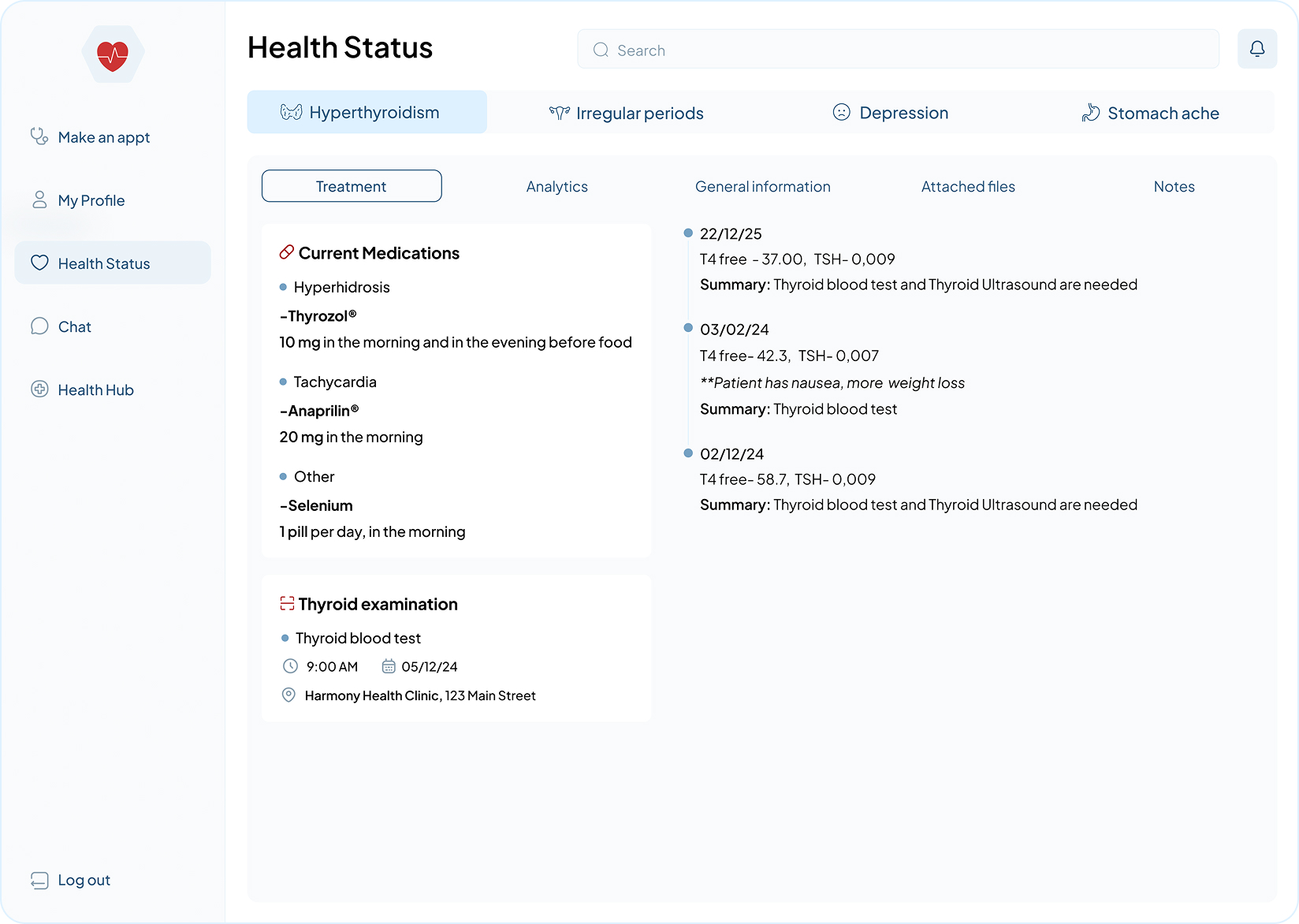
Health Status & Treatment Details
- Condition-Based Tab System: By organizing health data into tabs like "Hyperthyroidism" or "Depression," I allow patients to focus on one health concern at a time. This prevents the "wall of text" feeling common in medical portals.
- Logical Content Chunking: I divided the treatment page into clear sub-sections (Medications, Examinations, and History). This helps the user find exactly what they need—like how many pills to take—in under 3 seconds.
- Clear Medication Instructions: Instead of just listing drug names, I emphasized the timing and dosage (e.g., "in the morning and in the evening before food"). This directly addresses the most common user question: "When do I take this?"
- Temporal History (Timeline): The right-hand column uses a vertical timeline for test results. This makes it easy for patients to see if their numbers (like TSH levels) are getting better or worse over several months without having to open separate files.
- Actionable Summaries: Under each test result, I included a "Summary" line. This translates complex medical data into a simple "Next Step" (e.g., "Thyroid blood test needed"), which reduces patient anxiety and gives them a clear path forward.
- Contextual Details: The "Thyroid Examination" card includes the clinic name and address. This ensures the patient has all the logistical info they need for their upcoming appointment in the same place they see their medical reason for going.
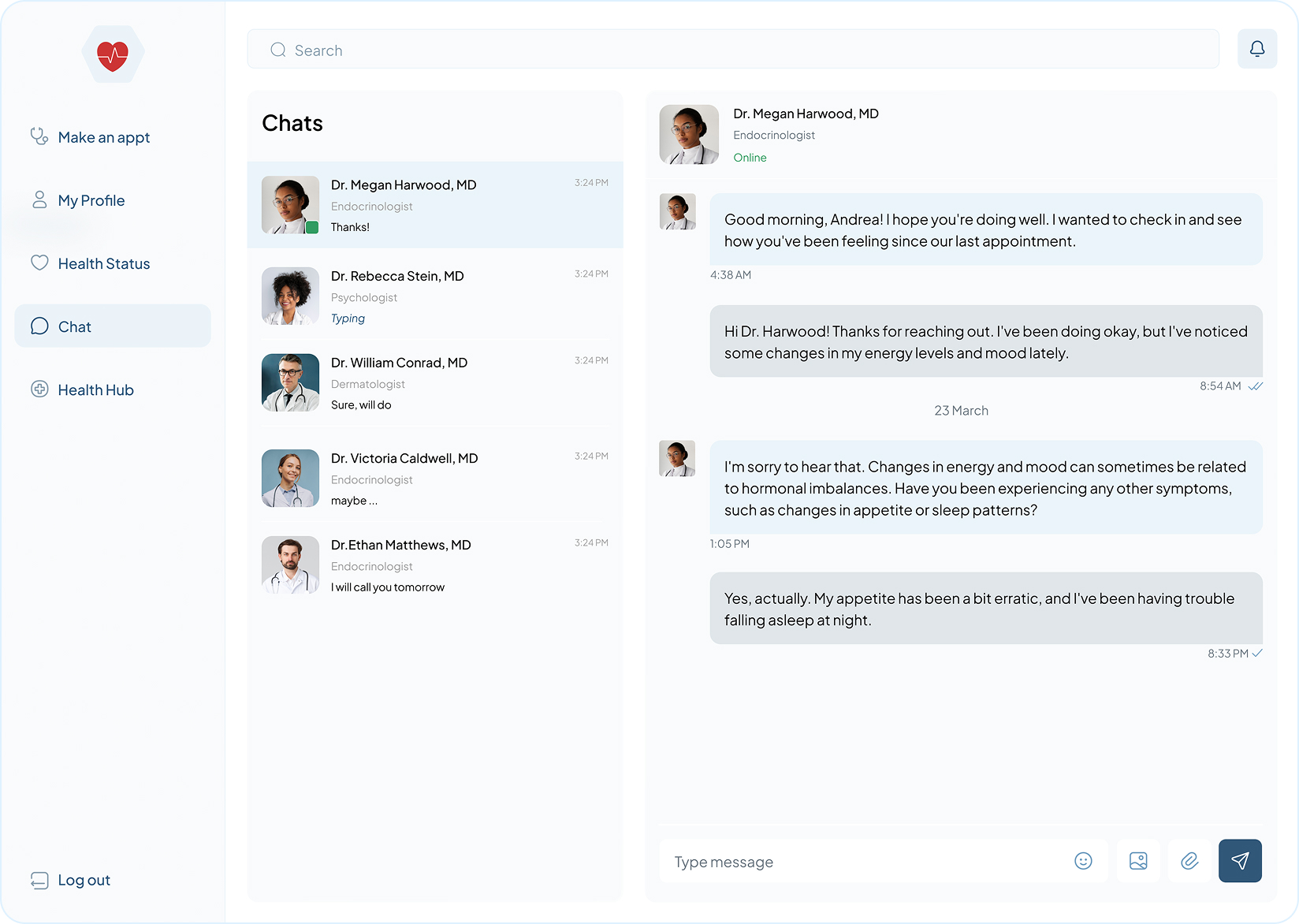
Telemedicine Chat Interface
- Specialist Recognition: Uses large doctor avatars to help patients quickly identify different specialists via visual memory.
- System Status: Features "Online" and "Typing" indicators to manage user expectations and reduce anxiety during medical wait times.
- Scannable Dialogue: Employs color-coded message bubbles to create a clear visual hierarchy between doctor and patient responses.
- Frictionless File Sharing: Places attachment icons directly within the input field for immediate sharing of symptoms or lab results.
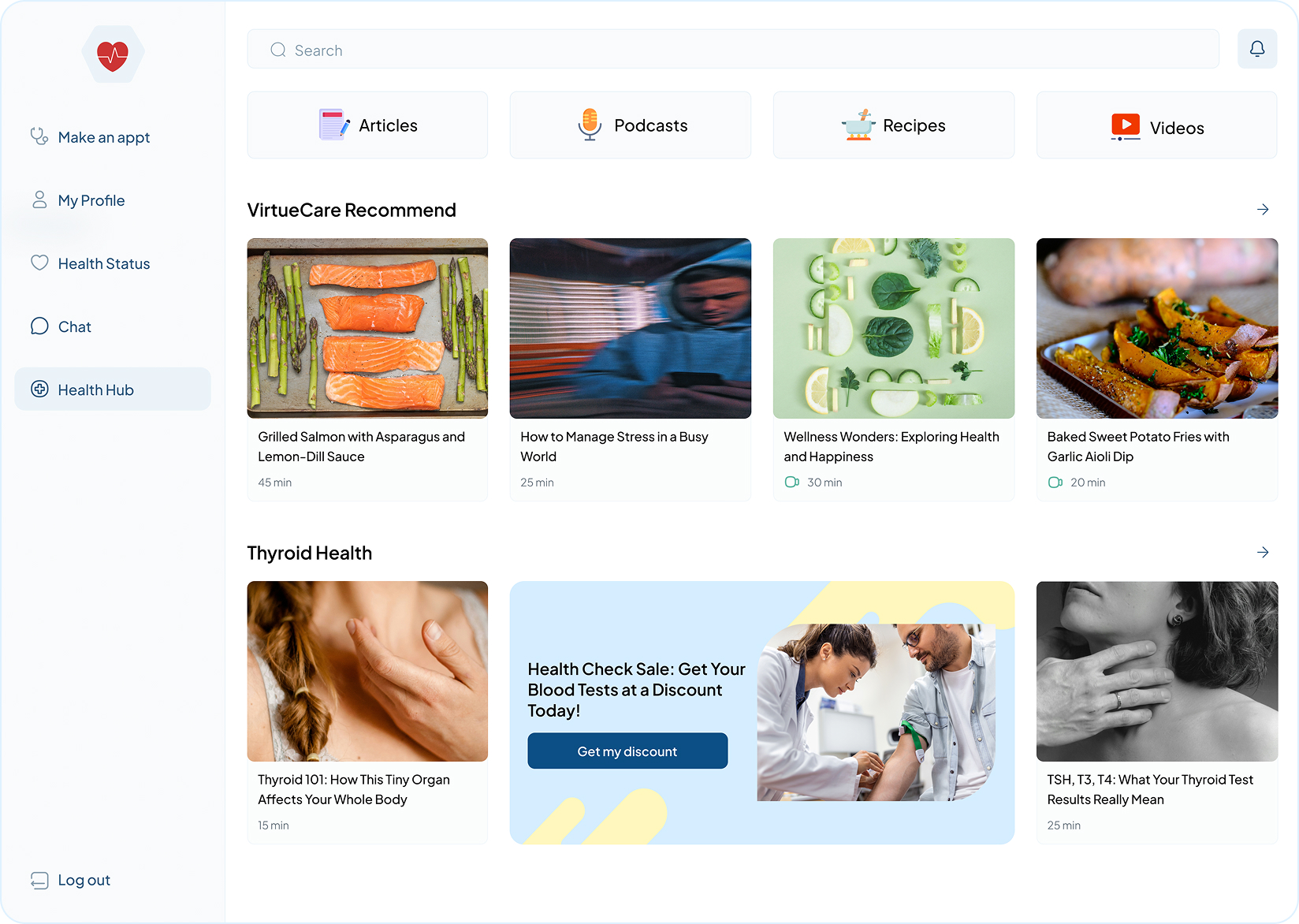
Health Hub (Content & Wellness)
- Multi-Modal Learning: Categorizes content by format (Articles, Podcasts, Recipes, Videos) to accommodate different user contexts and learning preferences.
- Condition-Specific Personalization: Prioritizes "Thyroid Health" content based on the user's medical profile, reducing information noise and increasing relevance.
- Time-Managed Engagement: Displays "Read/Watch Time" on every card, helping busy users decide if they have the capacity to engage before clicking.
- Contextual Conversion: Integrates discount banners for relevant lab tests directly within the health feed, turning information into actionable care.
Video Consultation
- Immersion & Focus: Features a minimalist, edge-to-edge video layout to maintain a personal, "face-to-face" feel and minimize technical distractions.
- Centered Control Hub: Groups all essential call actions (Microphone, End Call, Camera) in a single bottom bar for fast, intuitive access during the session.
- Secondary Utility Access: "View" (medical data) and "Chat" (messaging) are moved to the sides of the screen. This lets the patient look at their health info while still keeping their eyes on the doctor.